REST API Statistics v2 - Customer Migration Guide
Introduction
We are currently rolling out an update to the metric definitions in the REST API Statistics endpoints. The endpoints will start serving the updated metrics automatically on December 15, 2026. This guide will help you migrate smoothly during the migration window, which is open now and closes on December 15, 2026.
Summary
- 3 endpoints are affected:
/v1/stats/show/:id,/v1/stats/showsand/v1/stats/activity- Endpoints will continue serving with current behavior until December 15, 2026, when they will be switched automatically to the new output.
- To test the new updated metrics object, a new query parameter has been enabled:
migration2026=true.
- New output
- The schema of the new output is backwards compatible. New fields have been added, no fields have been renamed or removed.
- Change:
viewsandviewerswill change in definition and value.- New fields
impressionsandunique_impressionsare introduced. - The
interactionsfield will ignore theinteractionTypesparameter and return all currently available interaction types. Note that the set of available types has shrunk, so some types reported before will no longer appear.
The change
The table below summarizes the changes per field:
| Field | New definition | Legacy definition | Change summary | Impact |
|---|---|---|---|---|
views | Total number of sessions in which a show was played for at least 3 seconds. | Number of on-play events detected. | DEFINITION CHANGE — The field name is unchanged, but values will differ significantly. | High 🔴 |
viewers | Number of unique users who loaded the player, regardless of watch duration. Replaced by unique_impressions. | Number of unique users with an on-play event. | DEFINITION CHANGE — The field name is unchanged, but values will differ significantly. | High 🔴 |
interactions | Counts of actions that take place during a player session. Broken down by interaction type, and by player session type (live, recorded). | Counts of actions that take place during a player session. Broken down by interaction type, and by player session type (live, recorded). | REDUCED SET — The structure is kept, but some interactions will no longer be reported. Also, the interactionTypes query parameter will be ignored. | Medium 🟡 |
impressions | Total number of times the player was loaded, regardless of watch duration. | NEW | Low 🟢 | |
unique_impressions | Number of unique users who loaded the player, regardless of watch duration. | NEW | Low 🟢 |
The following interaction types will no longer be reported: cookiesEnabled, minimize, restore, preview-paused:condense, preview-playing:condense. The endpoints will ignore the interactionTypes query parameter and return all available interactions.
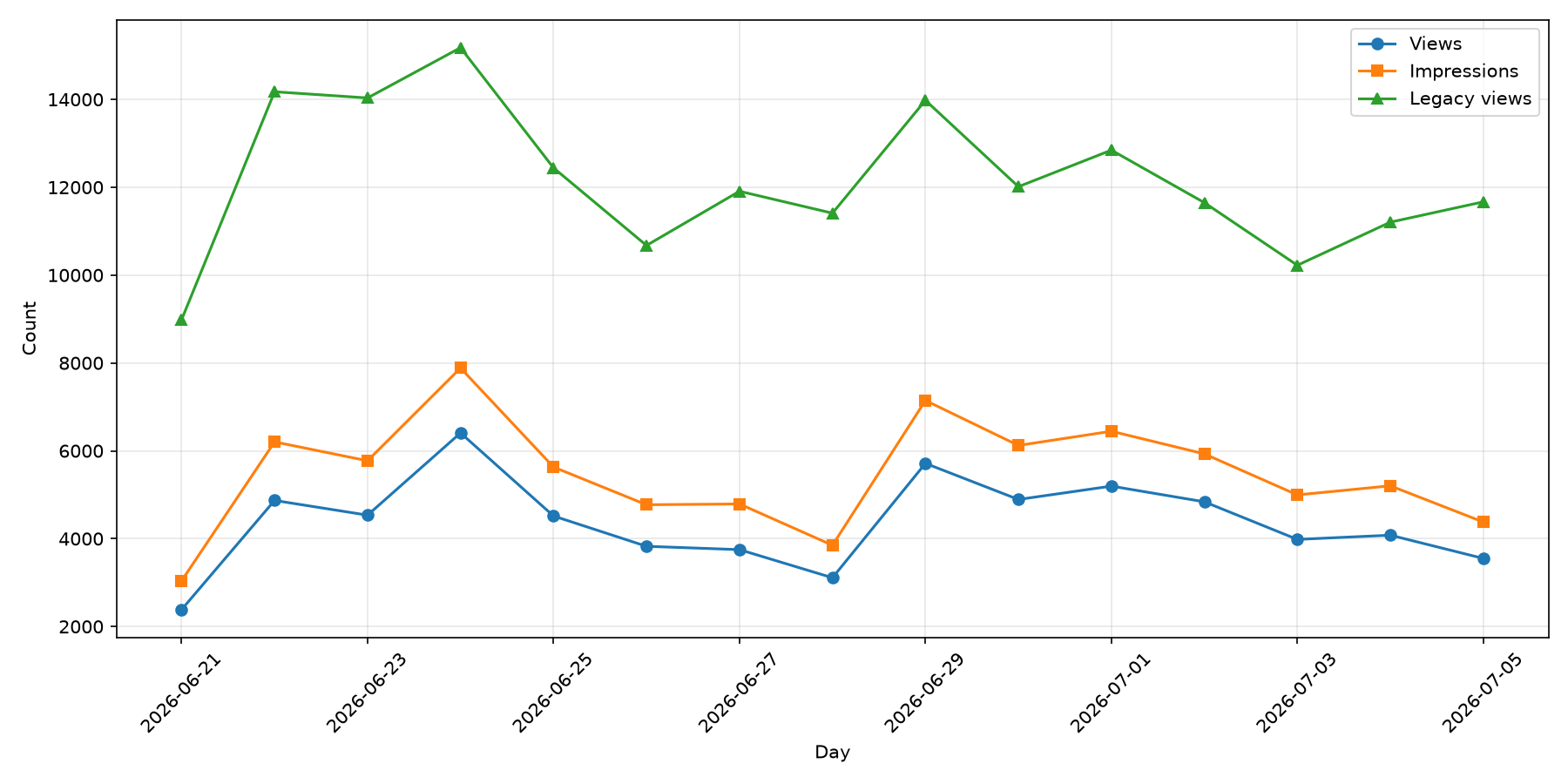
The biggest change in this migration is the definition of a view. Legacy views were defined as the total count of on-play events observed for a show. Compare that with the new definition, which defines a view as "a player session in which content has been watched for at least 3 seconds". We also introduced the metric of impressions, that counts how often players are loaded on a page, allowing you to calculate a conversion funnel more easily. Note that legacy views sit between the two new metrics: they are stricter than impressions (which counts every player load, even with no playback) but looser than the new views (which requires at least 3 seconds of watch time). No single new field is a 1:1 replacement for legacy views, so evaluate both against your own data before choosing. In the example below, you can observe the differences between legacy views (in green) and new views (blue) and impressions (orange).
These charts are illustrative. The size of the difference varies by customer. We recommend you assess the impact of the change by querying your own data with migration2026=true over a representative date range and compare the old and new values directly before making migration decisions.
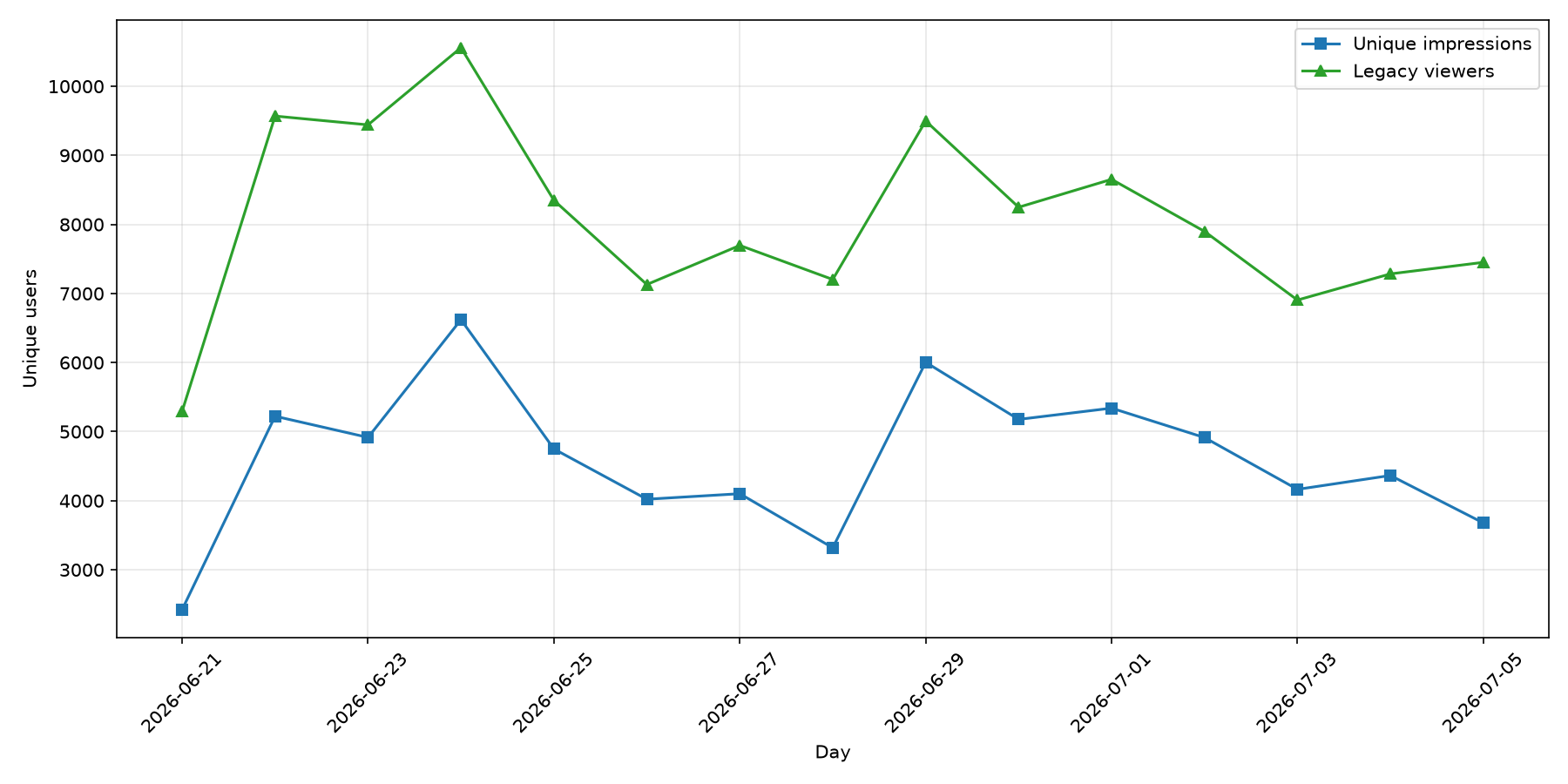
Similarly, viewers is being deprecated in favor of unique_impressions. Although the definitions are very similar, the underlying tracking has changed — session scoping, lifecycle rules, and event capture are all different, so numbers will differ. Here is an example of how the two metrics compare for some example shows:
What does it mean for me?
We have implemented the change in a way that lowers the impact for our customers as much as possible. Because the new schema only adds fields (nothing is renamed or removed), your integration will not break if you take no action.
However, the new definitions will change the values you receive, which can affect your analytics reporting. We therefore urge you to test the new output and evaluate the new metrics on your own systems. To access the new data, you only need to add the query parameter migration2026=true to your API call.
The key and value of the parameter are both case-sensitive.
For example, the following call should get you the new statistics on all shows that were streamed in June 2026.
BAM_REST_API_URL="https://liveshopping-api.bambuser.com/v1"
API_KEY="<your api key>"
FROM="2026-06-01"
TO="2026-06-30"

curl -S \
  -G "$BAM_REST_API_URL/stats/shows" \
  -H "Authorization: Token $API_KEY" \
  --data-urlencode "migration2026=true" \
  --data-urlencode "from=$FROM" \
  --data-urlencode "to=$TO"
How to migrate?
We recommend following this diagram to evaluate the analytics workflows that rely on these endpoints and take appropriate action.
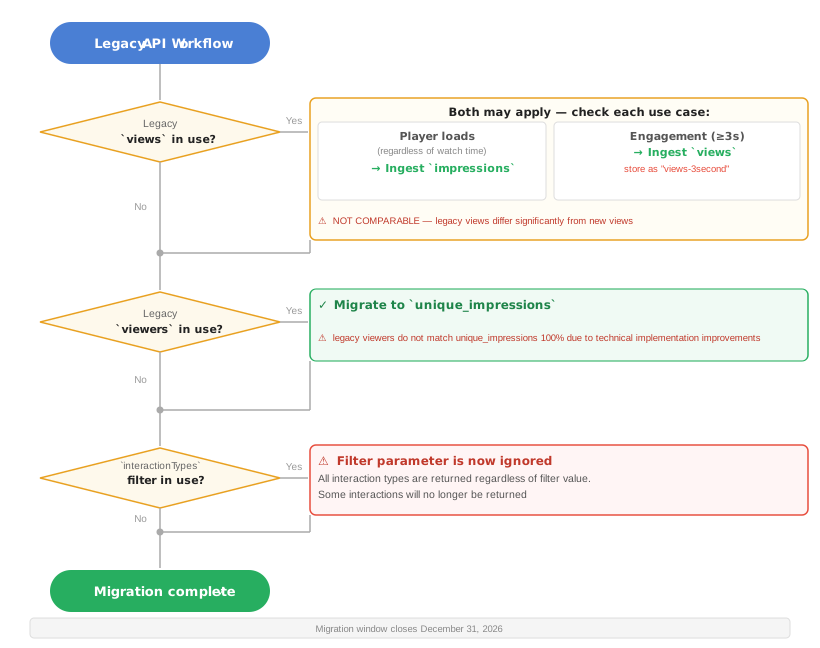
Step-by-step
- If you have workflows that currently rely on legacy
views- Analyze your use cases to understand whether new
viewsor newimpressionsmetrics fit your reporting better. - If some use cases rely on counting how often a Bambuser player was loaded on screen regardless of content consumption, we suggest ingesting the new
impressionsfield. - If some use cases are more focused on users engaging with the content, we suggest ingesting the new
viewsfield, which counts only when a user has streamed at least 3 seconds of content. We recommend storing the new metric under an alias such asviews-3secondto distinguish it from the legacyviewsmetric, since they are NOT COMPARABLE.
- Analyze your use cases to understand whether new
- If you have workflows that currently report on legacy
viewers- We recommend ingesting the new
unique_impressionsfield, which will give you the closest metric to the legacyviewersdefinition. - We have kept the
viewersfield as an alias tounique_impressionsin the new API response to reduce the upfront migration cost. This comes with the caveat that this will cause a historical discontinuity, since the metric will not correspond 100% with the oldviewerstechnical definition. We recommend moving away from the deprecatedviewersfield as soon as possible since it will be removed in the future.
- We recommend ingesting the new
- If you have workflows that rely on
interactions- The
interactionTypesquery parameter is now ignored — the endpoints return all available interaction types. - The following types are no longer reported:
cookiesEnabled,minimize,restore,preview-paused:condense,preview-playing:condense. If any workflow depends on these, remove that dependency before the cutover. - Confirm the interaction types you consume still appear in the new output before December 15, 2026.
- The
FAQ
Q: Have these changes broken my existing integration?
No. The revised metrics are opt-in during the migration window through the use of the migration2026=true query parameter. Without any action, you will continue to receive the metrics as you have until now up until December 15, 2026.
Q: Will my existing integration stop working after December 15, 2026?
Low risk. The new schema is backward compatible, only new fields have been added. If your current ingestion system is tolerant to new fields, the system should successfully parse the new output.
However, taking no action will also mean that the metric definition changes from views and viewers will be reflected as big changes in your dashboards.
Q: Will my numbers change after opting in / after the migration deadline?
Yes — and this is expected. Once enabled, views and viewers will reflect the new definitions, the new metric fields will become available, and the changes in interactions will take place.
Q: Why are my numbers changing?
Starting in 2024, Bambuser updated how we track player sessions and views, resulting in more robust metrics, a clearer picture of engagement, and definitions that are fully aligned with billing. These new definitions are already reflected in your BamHub dashboards.
Q: Which new field replaces each old one?
- Legacy
views→ no clean 1:1 replacement. Chooseimpressions(player loads) or newviews(≥3 seconds watched) depending on whether you care about reach or engagement. Store newviewsunder an alias such asviews-3second, since it is not comparable to legacyviews. - Legacy
viewers→unique_impressions(closest match).viewersis retained as a deprecated alias that now returnsunique_impressionsvalues and will be removed in the future. interactions→ same field, but a reduced set of types, and theinteractionTypesparameter is ignored.
Q: What should I do before opting in?
- Read this migration guide. Reach out to your CSM if you have any questions.
- Use the
migration2026=trueflag in the API to explore what the new data looks like. - Decide on a transition strategy between the legacy and new metrics.
- Communicate the cutover date to internal stakeholders so the step-change in dashboards is expected.
Q: What counts as a "view"?
A player session where the user watches at least 3 seconds of content. FAB previews are excluded.
Q: Why don't my old views numbers match the new ones?
The views metric has been redefined. Legacy views counted playback starts (on-play events), whereas new views requires at least 3 seconds of watch time, and the separate impressions field counts player loads. Legacy views does not map cleanly onto either new field, so expect your numbers to differ from both.
Q: What counts as an "impression"?
Any player session started — the player loaded on the user's device, regardless of whether they watched.
Q: Why don't my old viewers numbers match the new ones?
The viewers field has now been deprecated. It has been replaced by unique_impressions. While both are close in definition, the tracking methodology itself changed — sessions are now scoped per video (not per domain), use a 15-minute inactivity timeout, and capture events more reliably.
Q: What is a "player session"?
A continuous viewing experience by one user, beginning when they load the player and start playback. Sessions persist through pauses under 15 minutes and page refreshes, and terminate after 15 minutes of inactivity.