Bambuser Social Commerce SDK Android
Overview
BambuserCommerceSDK is a lightweight SDK for integrating Bambuser video player and commerce experience into your android applications in order to enhance your app with interactive video commerce features that streamline the video shopping experience.
Requirements
- Targets Android 35
- Minimal support API is 26 (Android 8+)
- Compose BOM version is 2025.02.00
- Kotlin version => 2.0.0
Installation
First, add a new maven repository to your dependency resolution management:
repositories {
  google()
  mavenCentral()
  // other repositories you might have...

  maven {
      url "https://repo.repsy.io/mvn/bambuser/bambuser-commerce-sdk"
  }
}
Then add the dependency into your app/build.gradle:
implementation("com.bambuser:commerce-sdk:$insert the latest version")
Configure Shoppable Video in BamHub
Before you can load videos in the SDK, you need to prepare a playlist and a placement in your BamHub. The placement's Component ID is the value you will pass to the SDK to fetch the right playlist for a given surface in your app.
1. Open the Shoppable Video workspace
Sign in to your BamHub and switch to the Shoppable Video workspace. From here you have access to your videos, playlists and placements.
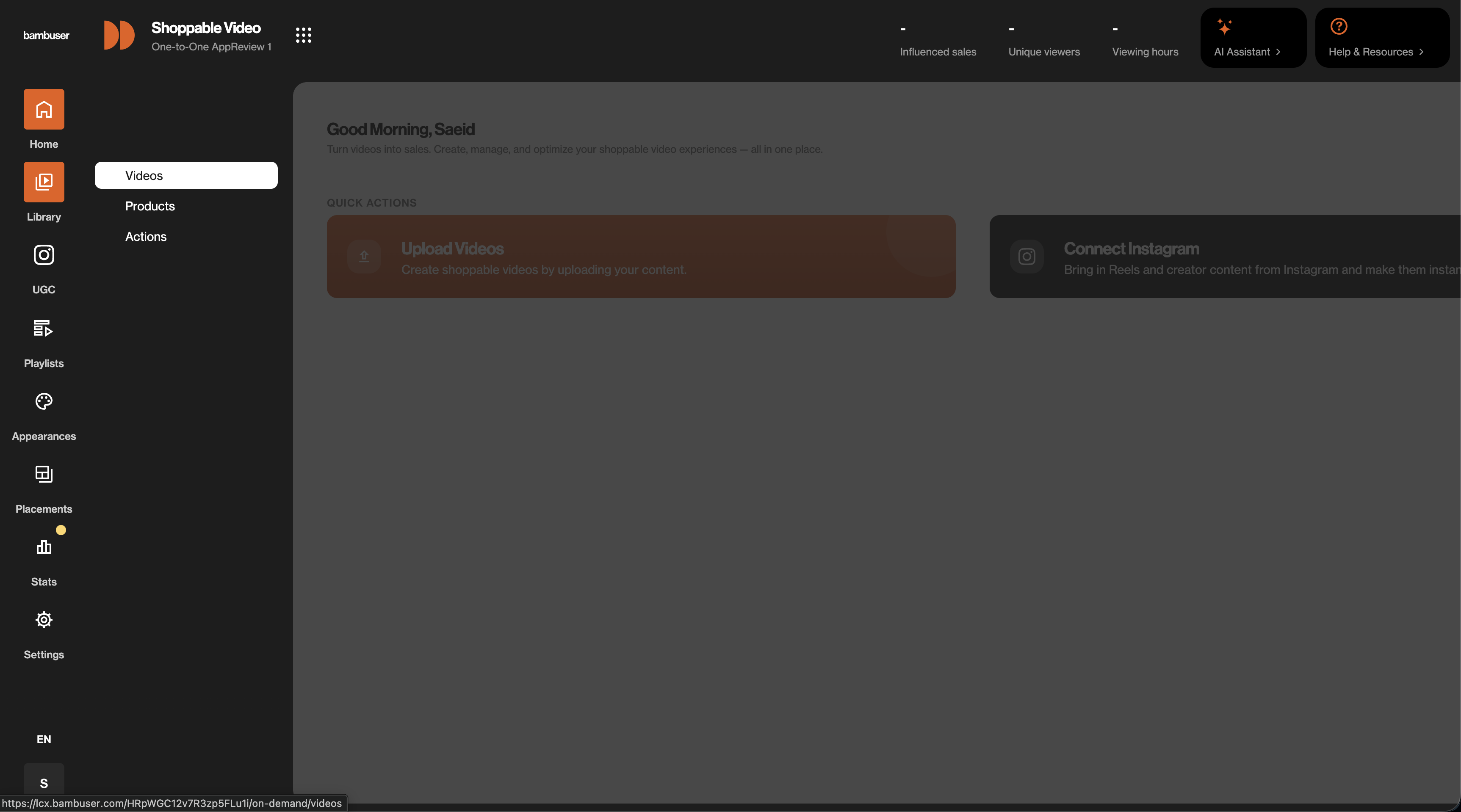
2. Add videos and group them into a playlist
Upload the videos you want to use, then open Playlists and create a playlist that contains the videos you want to surface in the app.
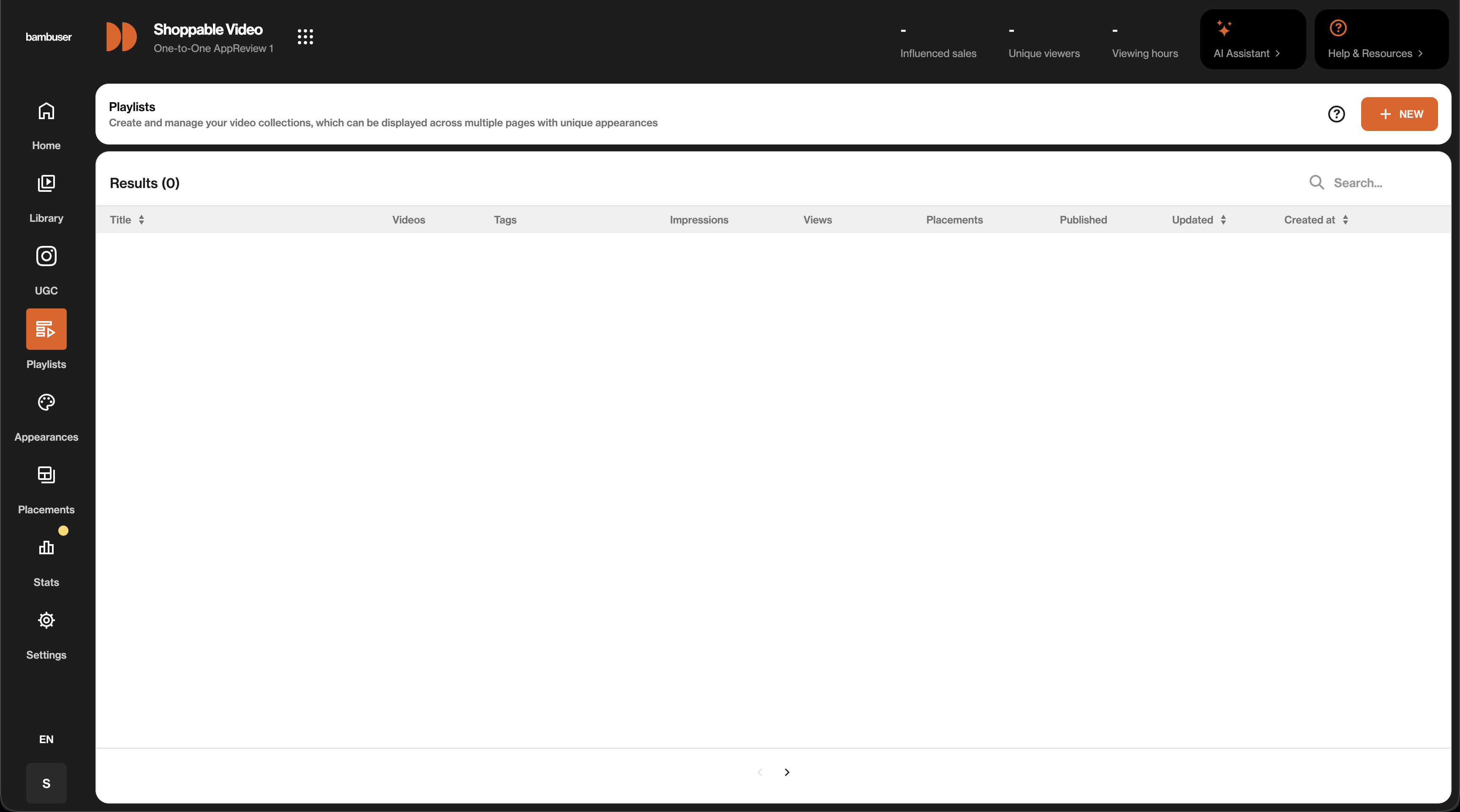
3. Create a new placement
Open Placements in the sidebar and click NEW to start a new placement. Placements are what bind a playlist to a specific surface in your app.
4. Add a placement rule with a Component ID
In the Setup tab, give the placement a title and add a new placement rule. Set Field to Component ID and Condition to Equals, then enter the value you want the app to use (for example home-page or mobile-sdk-tests).
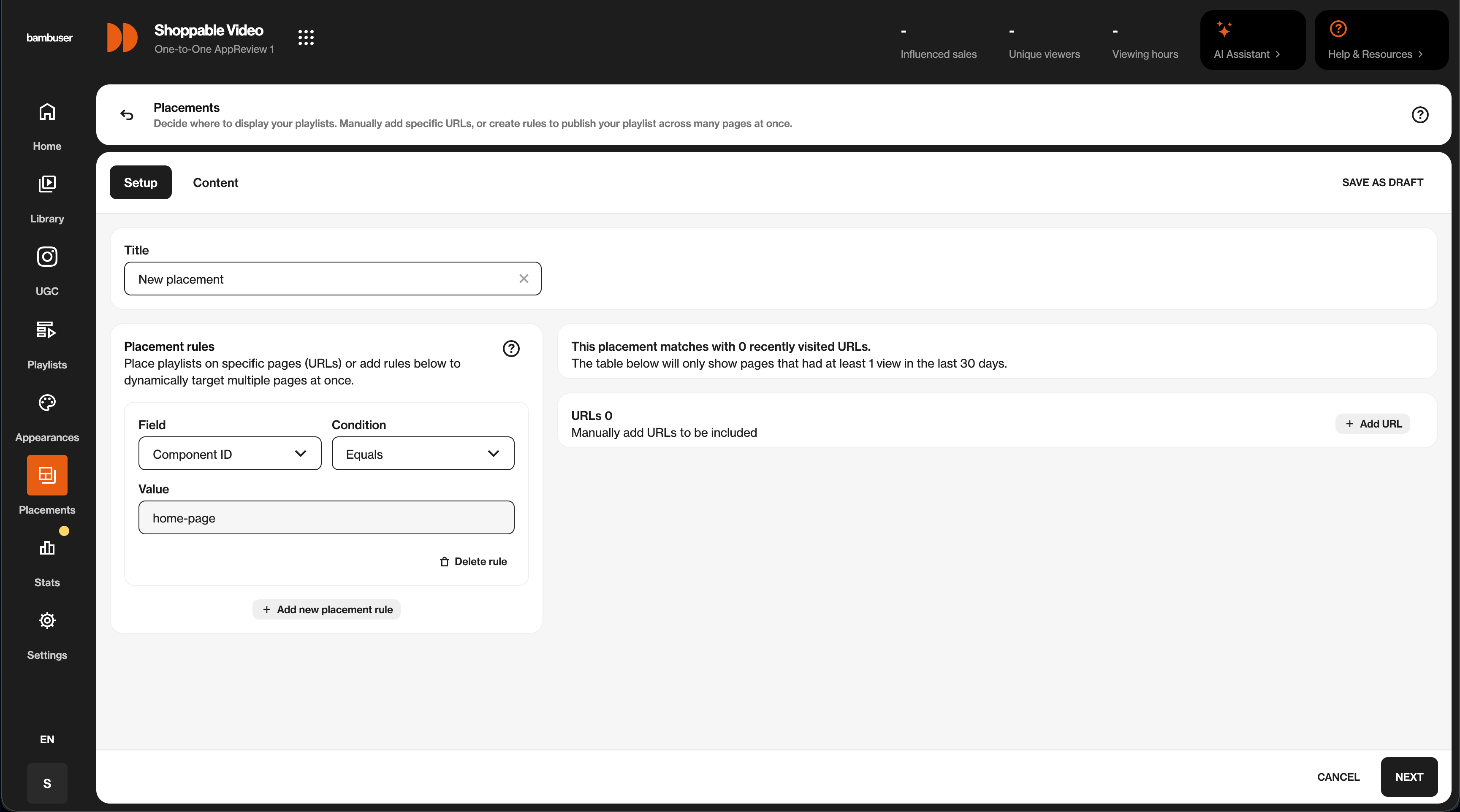
The Component ID is the same string you pass to the SDK in your mobile app. Choose a value that describes the surface where the playlist will appear so it stays easy to map between BamHub and your code.
5. Select the playlist and publish
Switch to the Content tab and pick the playlist you created (or create a new one inline). Click PUBLISH to make the placement live.
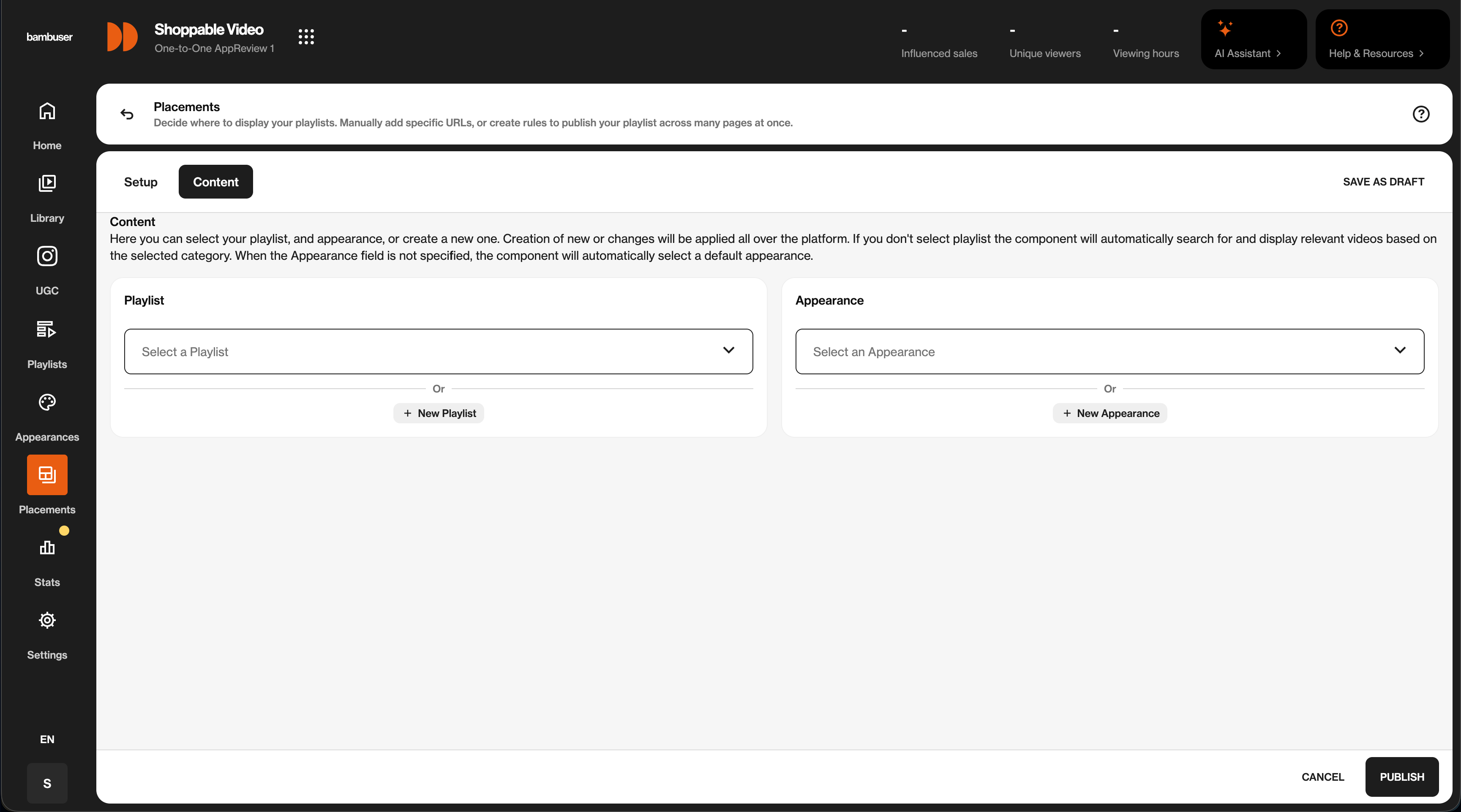
Once the placement is published, your app can load it through the SDK using the organization ID and the Component ID you just configured.
Player Initialization
The SDK provides flexible setup options so you can configure the player dynamically based on your needs, supporting live, pre-recorded, and shoppable video.
For complete examples and working integrations, check out our example app.
Setup
Loading Shoppable Video via SDK is very simple; you can request the videos available in Bamhub.
Create Video Configuration
You need to create the configururation for each shoppable videos. The general configuration setup looks like below. For more details on video configurations please check our Preview API Reference and Player API Reference page.
val shoppableVideoConfigurations = mapOf(
    "thumbnail" to mapOf(
        "enabled" to true, // IF false, it will show a black screen
        "showPlayButton" to true,
        "showLoadingIndicator" to true,
        //preview" to "", Add a custom thumbnail image URL if needed
    ),
    // Configuration for preview mode
    "previewConfig" to mapOf(
        "settings" to "products:true; title: false; actions:1; productCardMode: thumbnail",
    ),
    // Configuration for fullscreen mode
    "playerConfig" to mapOf(
        "buttons" to mapOf(
            "dismiss" to "event",
            "product" to "event",
        ),
        "currency" to "USD", // Mandatory for product hydration
    )
)
Now you can use this configuration to load videos in three different ways
- Bind a playlist to a placement in BamHub and fetch it by its Component ID
- Construct a playlist via SKU. Fetch the videos where the product SKU is added
- Embed individual videos via the Video IDs. If you already have a Bambuser video ID.
Get Playlist videos
// Initialize the Bambuser SDK with the server region
// Set OrganizationServer to .US for lcx.bambuser.com, or .EU for lcx-eu.bambuser.com dashboard URLs.

val sdk = BambuserSDK(
    applicationContext = context,
    organizationServer = OrganizationServer.US, // or OrganizationServer.EU
)

val bambuserCollectionStateFlow = MutableStateFlow<BambuserCollection?>(null)

// suspended function that needs to run under a coroutine scope
// the function can throw an exception if the request failed
coroutineScope.launch {
    try {
        val response = sdk.getShoppableVideoPlayerCollection(
            BambuserCollectionInfo.Playlist(
                orgId = "$orgId",
                componentId = "$componentId",
            ),
        )
        bambuserCollectionStateFlow.value = response

        response.videoIdList.forEach { videoId ->
            sdk.GetLShoppableVideoView(
                videoConfiguration = BambuserVideoPlayerConfiguration(
                    events = listOf("*"),
                    configuration = shoppableVideoConfigurations,
                    videoType = BambuserVideoAsset.Shoppable(videoId),
                ),
                videoPlayerDelegate = object : BambuserVideoPlayerDelegate {
                    override fun onNewEventReceived(
                        playerId: String,
                        event: BambuserEventPayload,
                        viewAction: ViewActions
                    ) {
                        // Handle events received
                    }

                    override fun onErrorOccurred(
                        playerId: String,
                        error: Exception
                    ) {
                        // Handle errors
                    }
                }
            )
        }
    } catch (e: Exception) {
        Log.d(tag, "getShoppableVideoPlayerCollection has exception: $e")
    }
}

// Access pagination info from the cached collection
val collection = bambuserCollectionStateFlow.value
val currentPage = collection?.pagination?.page
val totalPages = collection?.pagination?.totalPages
val pageSize = collection?.pagination?.pageSize
val totalItems = collection?.pagination?.total
The componentId is the value you set on the placement rule in BamHub (see Configure Shoppable Video in BamHub). Use a value that maps cleanly to the surface in your app, such as home-page or product-details. If you have multiple apps in the same organization, you can use the packageName parameter on BambuserCollectionInfo.Playlist to differentiate between them.
Get videos for a particular SKU:
// Initialize the Bambuser video player with the server region
// You can choose between OrganizationServer.US or OrganizationServer.EU based on your region

val sdkInstance = BambuserSDK(
    applicationContext = this,
    organizationServer = OrganizationServer.US, // or OrganizationServer.EU
)

val collectionInfo = BambuserCollectionInfo.SKU(
    orgId = "$orgId",
    sku = "$productSKU",
)

// suspended function that needs to run under a coroutine scope
// the function can throw an exception if the request failed
lifecycleScope.launch {
    try {
        val collection = sdkInstance.getShoppableVideoPlayerCollection(collectionInfo)
        collection.videoIdList.forEach { videoId ->
                    sdkInstance.GetLShoppableVideoView(
                        videoConfiguration = BambuserVideoPlayerConfiguration(
                            events = listOf("*"),
                            configuration = shoppableVideoConfigurations,
                            videoType = BambuserVideoAsset.Shoppable(videoId),
                        ),
                        videoPlayerDelegate = object : BambuserVideoPlayerDelegate {
                            override fun onNewEventReceived(
                                playerId: String,
                                event: BambuserEventPayload,
                                viewAction: ViewActions
                            ) {
                                // Handle events received
                            }

                            override fun onErrorOccurred(
                                playerId: String,
                                error: Exception
                            ) {
                                // Handle errors
                            }
                        }
                    )
                }
    }
}

// Access pagination info
val currentPage = collection.pagination?.page
val totalPages = collection.pagination?.totalPages
val pageSize = collection.pagination?.pageSize
val totalItems = collection.pagination?.total
Load video with VideoID
// Initialize the Bambuser video player with the server region
// You can choose between OrganizationServer.US or OrganizationServer.EU based on your region

val sdkInstance = BambuserSDK(
    applicationContext = this,
    organizationServer = OrganizationServer.US, // or OrganizationServer.EU
)

sdkInstance.GetLShoppableVideoView(
    videoConfiguration = BambuserVideoPlayerConfiguration(
        events = listOf("*"),
        configuration = shoppableVideoConfigurations,
        videoType = BambuserVideoAsset.Shoppable(videoId),
    ),
    videoPlayerDelegate = object : BambuserVideoPlayerDelegate {
        override fun onNewEventReceived(
            playerId: String,
            event: BambuserEventPayload,
            viewAction: ViewActions
        ) {
            // Handle events received
        }

        override fun onErrorOccurred(
            playerId: String,
            error: Exception
        ) {
            // Handle errors
        }
    }
)
Delegate Protocol
The BambuserCommerceSDK provides the BambuserVideoPlayerDelegate an interface for handling communications from a Bambuser video player instance. By implementing this interface, your class can receive callback messages when new events occur or errors are encountered.
Available Methods:
val delegate = videoPlayerDelegate = object : BambuserVideoPlayerDelegate {
    override fun onNewEventReceived(
        playerId: String,
        event: BambuserEventPayload,
        viewAction: ViewActions
    ) {
        // Handle events
    }

        override fun onErrorOccurred(
            playerId: String,
            error: Exception
        ) {
            // Handle errors
        }
   }
For more detailed information please check our Github Repo
Conversion Tracking
Bambuser Conversion Tracking for Shoppable Videos gives you the most value out of your Shoppable videos performance statistics. The Bambuser Conversion tracker enables merchants to attribute the relevant conversions to the Shoppable videos.
To track conversions within the BambuserCommerceSDK, utilize the track function provided by the BambuserPlayerView.
This function transmits necessary data sets to Bambuser Analytics.
lifecycleScope.launch {
    sdkInstance.track(
        eventName = "purchase",
        data = mapOf(
            "purchase" to mapOf(
                "id" to "abcd",
                "subtotal" to 70.99,
                "currency" to "USD",
                "total" to 74.98,
                "tax" to 14.2,
                "shippingCost" to 3.99,
                "shippingMethod" to "Store pickup",
                "coupon" to "SUMMER_SALE"
            ),
            "products" to listOf(
                mapOf(
                    "id" to "314-7216-102",
                    "name" to "Tennis Shoe Classic - Size 10",
                    "image" to "https://example.com/images/314-7216-102.jpg",
                    "price" to 70.99,
                    "currency" to "USD",
                    "quantity" to 1,
                    "brand" to "Plausible Co.",
                    "category" to "Footwear > Sports > Tennis",
                    "location" to "https://example.com/products/314-7216"
                ),
            ),
        ),
    )
}
To log an event, you must supply and include additional data as a map with string keys and values of any type Map<String, Any>. Note that the example format is for illustrative purposes only.
To log an event, you must supply and include additional data as a map with string keys and values of any type Map<String, Any>.
Note that the example format is for illustrative purposes only.
For the precise data structure required for each event, please refer to our Shopper Events Tracking documentation, where you also find details about fields and types for Transaction and Product objects.
Configuration and Functions
To find the available configuration options for the Preview Player, please refer to Preview API Reference
To find the available configuration and functions for the Video Player in detail, please refer to Bambuser Player API Reference