SSO with Okta using SAML
Overview
This guide provides step-by-step instructions for configuring Single Sign-On (SSO) with Security Assertion Markup Language (SAML) 2.0 using Okta as the Identity Provider (IdP) for Bambuser Live Shopping. This integration allows your organization to manage user authentication through your existing Okta infrastructure.
Prerequisites
- An active Okta administrator account
- Access to the Bambuser Live Shopping dashboard
- Administrative access to your organization's domain DNS settings
- The domain used for user emails must be verified in Okta
Configuration Steps
1. Create an Okta SAML Application
- Log in to your Okta Admin Dashboard
- Navigate to Applications > Applications
- Click Create App Integration
- Select SAML 2.0 and click Next
- Enter an App name (e.g., "Bambuser Virtual Commerce")
- Click Next to configure SAML
2. Configure SAML Settings
General Settings
- Single sign on URL (ACS URL):
- US Data Region:
https://svc-prod-us.liveshopping.bambuser.com/functions/auth/sso/saml/callback - EU Data Region:
https://svc-prod-eu.liveshopping.bambuser.com/functions/auth/sso/saml/callback
- US Data Region:
- Audience URI (SP Entity ID):
bambuser_saml_service_provider - Name ID format: EmailAddress
- Application username: Email
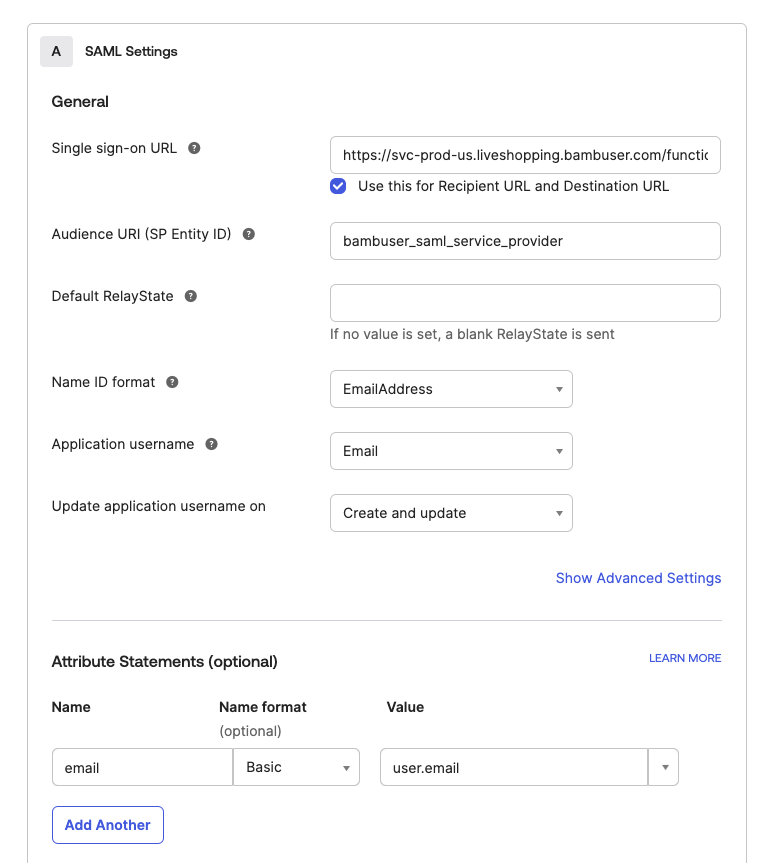
Attribute Statements
Add the following attribute statements:
- Name:
email- Value:
user.email
- Value:
- Name:
firstName- Value:
user.firstName
- Value:
- Name:
lastName- Value:
user.lastName
- Value:
Group Attribute Statements (Optional)
If you want to pass group information:
- Name:
groups- Filter:
Matches regex.*
- Filter:
3. Configure Feedback and Provisioning
- Set Provisioning to Disabled (SCIM provisioning is not supported)
- Click Next to review your settings
- Click Finish
For organizations requiring automated user provisioning and deprovisioning, you can implement a custom SCIM (System for Cross-domain Identity Management) integration using our public API.
Domain Configuration
Your Data Region URL is determined by your Bambuser dashboard location:
| Region | Dashboard URL | SAML ACS URL |
|---|---|---|
| Europe | https://lcx-eu.bambuser.com/ | https://svc-prod-eu.liveshopping.bambuser.com/functions/auth/sso/saml/callback |
| United States | https://lcx.bambuser.com/ | https://svc-prod-us.liveshopping.bambuser.com/functions/auth/sso/saml/callback |
Share SAML Configuration with Bambuser
After configuring the Okta application, share the following information with your dedicated Bambuser contact:
-
Method 1: Export and share the metadata file
- In Okta, go to Sign On > Settings > SAML 2.0
- Click View Setup Instructions
- Download the metadata file and share it with Bambuser
-
Method 2: Manual configuration
- Identity Provider Single Sign-On URL
- Identity Provider Issuer (Entity ID)
- X.509 Certificate (Base64 encoded)
Configure User Access
Option A: Manual User Management (Default)
Manage users/roles manually in the Bambuser dashboard.
For each new user:
- Add them to your Okta
- Manually create their account in the Bambuser dashboard
- Assign appropriate roles and permissions on the Bambuser dashboard
Option B: Group-based Management (Recommended)
Manage users/roles through groups in Okta:
- In Okta, create groups for different permission levels (e.g.,
bambuser-owner,bambuser-moderator) - Share the group names with your Bambuser representative
- Bambuser team will map these groups to existing roles in Bambuser ecosystem
Testing and Verification
Once the SAML configuration is completed by Bambuser on your workspace, you can test the integration by logging in to the Bambuser dashboard.
Testing the Integration
- Assign test users to the application in Okta
- Attempt to log in to the Bambuser dashboard
- Verify successful redirection to Okta
- Confirm successful authentication and session creation
Test Environment Considerations
If you have a separate Bambuser workspace for testing, you can use it to test the SAML integration.
- Use a different email domain for testing to avoid impacting production users. Example:
- Production domain:
user@company.com - Test domain:
user@test-company.com
- Production domain:
Authentication Flow
Bambuser currently supports Service Provider-initiated login flow only. Identity Provider-initiated login flow is not supported.
- User navigates to the Bambuser login page
- User enters their email address and clicks Sign in with Email
- System validates the domain and redirects to your Okta login page
- User authenticates with their Okta credentials
- Upon successful authentication, user is redirected back to Bambuser with a SAML assertion
- Bambuser validates the assertion and creates a session for the user
Support
For additional assistance, please contact your dedicated Bambuser support representative or email support@bambuser.com with "Okta SAML Integration" in the subject line.